Annotating Custom Datasets
This guide explains how to prepare and annotate your own datasets for use with PyABSA. The primary tool for this is the Data Preparation Tool (DPT), which can be found in the ABSADatasets repository.
Annotation Workflow
The process of annotating a custom dataset involves the following steps:
Pre-segmentation: Before annotating, your text needs to be segmented into words. For languages that are not space-delimited, you can use the
pre_word_segment_for_non_english_data.pyscript provided in the DPT.Annotation: Use the browser-based annotation tool to label your segmented text. This tool allows you to mark aspect terms and assign sentiment polarities.
Conversion: Once annotated, you can convert your dataset into formats suitable for different tasks, such as Aspect Polarity Classification (APC) or Aspect Term Extraction and Polarity Classification (ATEPC).
Integration: After preparation, you can merge your custom dataset with the integrated datasets in PyABSA to use it for training and evaluation.
Using the Annotation Tool
The annotation tool is a standalone, browser-based application that simplifies the process of labeling your data.

When you save your work in the tool, it generates three files:
A CSV file for classic sentiment analysis tasks.
A TXT file formatted for use with PyABSA.
A JSON file to save your progress and resume annotating later.
PyABSA Data Format
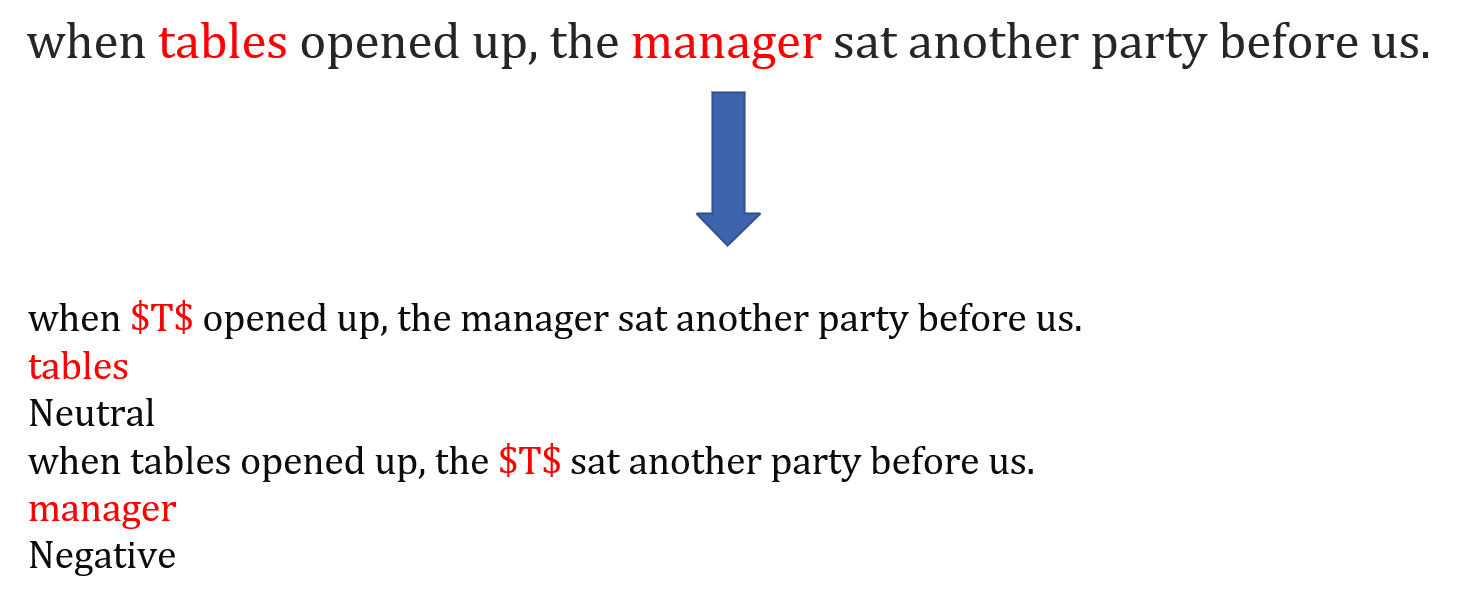
The TXT file generated for PyABSA follows a specific format, where each line represents a sentence and its annotations. The aspect terms are marked, and their sentiment polarity is assigned, as shown in the example below.
By following this workflow, you can create high-quality, annotated datasets for your aspect-based sentiment analysis tasks.